SoloStats Coach
Make data-driven coaching decisions during matches. Access real-time analytics on your phone to identify strengths, weaknesses, and winning adjustments—all while the game is happening.
Overview
Coaching decisions made during timeouts and between sets can win or lose matches. SoloStats Coach gives you instant access to the analytics you need—right on your phone—so you can make adjustments that actually work. See which rotations are struggling, which players are performing, and where you're losing points—all in real-time during the match.
Track stats with SoloStats LIVE, SoloStats123, or SoloStats Voice while connected to the internet, and access your analytics instantly on your mobile device.
See SoloStats Coach in Action
Key Features
Multiple Match Selection
Select any combination of matches that you want to aggregate. Quick select groups of matches in multiple ways: Last Match, Last Day, Last 2-4 Days (for easy tournament tracking), or Entire Season.
Flexible Viewing Options
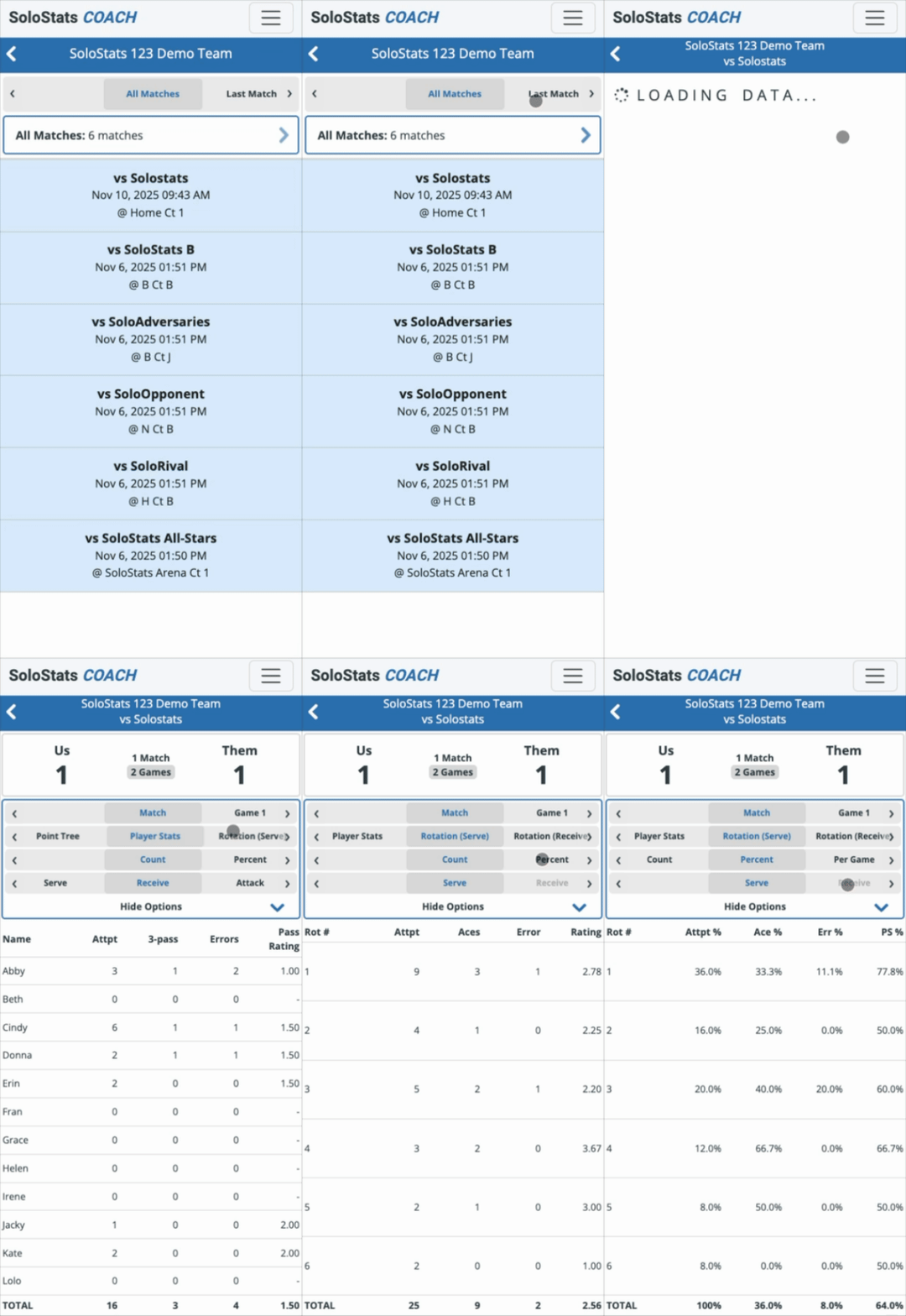
View Match vs Game scores for all selected matches. Switch between stats by Count, Percentage, or Per Game. View tables in portrait view on phones. Sort any table by column.
Point Tree
The Point Tree provides details on how you are winning or losing points. By Game or Match, understand exactly what's going on. Is your opponent beating you or are you giving away the game by making too many errors?
Error Tree
Compare all of your errors to your opponent in one table. Understand how you are losing points compared to your opponents and identify areas for improvement.
Player Skill Rankings
Every skill category plus points won/lost and playing time are provided under Player Stats. Click any heading to sort low-high or high-low and know exactly who's getting the job done. Pages divided by Count, Percent, and Per Game.
Rotational Stats
Know how each rotation Serving or Receiving is doing. Understand where you may be having issues and how to make the key adjustments you need to win more matches. Same as the player stats, this page is divided by Count, Percent, and Game.
Game Log
Get the play-by-play in detail LIVE during the match or review afterwards to understand exactly what happened. See the point runs and details of each play. Get the insights you need to continue your team's performance improvements.
How It Works
Track Stats
Use SoloStats LIVE, SoloStats123, or SoloStats Voice to record match statistics while connected to the internet.
Access on Mobile
Launch SoloStats Coach on your phone or tablet to view analytics instantly.
Analyze Performance
Review Point Tree, Error Tree, Player Stats, and Rotational Stats to identify strengths and weaknesses.
Make Adjustments
Use insights during timeouts, between sets, or after matches to improve performance.
Get More with the Starter Bundle
SoloStats Coach is included with the Starter Bundle. Get advanced analytics, stat tracking, and professional tools all in one package.
What's Included in the Starter Bundle
Match stats in all stat capture apps
Track stats with any SoloStats app
SoloStats Coach
Mobile access to WebReports analytics
WebReports Analytics
Advanced analytics and reporting
Stat Tracking Apps
Track stats with any SoloStats app
Tutorial & Getting Started
Getting Started with SoloStats Coach
To begin using SoloStats Coach, ensure you have taken stats with either SoloStats LIVE or SoloStats 123. For real-time updates, maintain an internet connection while recording stats.
Track Stats & Backup
Use SoloStats123 or SoloStats Live to track match statistics. Press 'Backup' in SoloStats to push all stats to WebReports.
Login
Launch SoloStats Coach and log into your WebReports account, which requires an active trial or subscription. Enter your WebReports account email and password.
Select Device
If multiple devices are connected to your WebReports account, select the one currently used for stat recording.
Select Team
Choose the active team if you manage more than one.
Select Match
Decide whether to view a current match or aggregate stats for the day or season.
Point Tree
The Point Tree details how points are won or lost by game or match, helping you understand if the opponent is outperforming you or if errors are costing the game.
Player Skill Rankings
Access comprehensive player stats, including skill categories, points won/lost, and playing time. Click any heading to sort and identify top performers.
Rotational Stats
Analyze each rotation's performance in serving or receiving to identify issues and make necessary adjustments.
Game Log
Review detailed play-by-play logs live during the match or afterward to understand game dynamics, point runs, and specific plays.
More Tips on Coaching
Utilize stats to enhance rotation optimization, formation concepts, and matchups against opponents.
- ✓Use Point Tree to identify if you're losing points due to errors or opponent performance
- ✓Sort player rankings by different skills to find strengths and weaknesses
- ✓Review rotational stats to optimize lineups and substitutions
- ✓Use Game Log during timeouts to reference specific plays and point runs
📚 Learning Resources
💡 Tips for Success
- ✓Perfect for tournament days - access analytics between matches
- ✓Use during timeouts to make data-driven adjustments
- ✓Sort any table by column to find top performers quickly
Frequently Asked Questions
Do I need internet to use SoloStats Coach?
Yes, SoloStats Coach requires an internet connection to sync stats from your tracking apps. Track with SoloStats LIVE or SoloStats123 while connected, and your stats will be available in SoloStats Coach.
Can I use SoloStats Coach without WebReports?
SoloStats Coach is included with the Starter Bundle and works alongside WebReports. It's the mobile version of WebReports analytics.
What devices support SoloStats Coach?
SoloStats Coach works on iOS and Android devices. The interface is optimized for mobile viewing, including portrait mode on phones.