SoloStats WebReports — Volleyball Analytics
Volleyball analytics in your browser: rotation breakdowns, hitting % trends, match comparisons, and player reports — turn raw stats into lineup and practice decisions.
What is SoloStats WebReports? SoloStats WebReports is a browser-based volleyball statistics dashboard that automatically syncs with the SoloStats 123 app. After a match, coaches can share live stat reports — kills, hitting percentage, digs, blocks, and more — directly with players and parents via a web link, with no app download required.
Built for volleyball coaches who want to share stats instantly
WebReports was designed for high school and club volleyball coaches who track stats on SoloStats 123 during matches and need a simple way to share that data with their team. No spreadsheet exports. No emailing PDFs. Just a link — viewable on any phone or browser — that updates in real time as stats are recorded.
Looking for the full ecosystem in one place? See all SoloStats volleyball apps.
Overview
Knowing which rotations are struggling, which players are performing, and where you're losing points is the difference between winning and losing. SoloStats WebReports transforms your match statistics into clear, actionable insights so you can make data-driven coaching decisions that actually work.
Track stats with SoloStats123, SoloStats Live, or SoloStats Voice, and your stats automatically sync to WebReports for instant analysis.
Comprehensive Analytics
Rotation Breakdown
Analyze performance by rotation to identify strengths and weaknesses
Player Breakdown
Compare player performance across all skill categories
Trend Reports
Track performance trends over time to measure improvement
Match Comparison
Compare performance across matches and tournaments
National Benchmarks
Compare your team against national performance standards
Volleyball matrix — rotation efficiency
The rotation breakdown and related views in WebReports act as a volleyball matrix for your team: they map sideout and scoring efficiency across all six rotations so you can see exactly where points are won and lost. Pair that with trend charts for a full picture of offensive and defensive flow by rotation.
The rotation matrix view maps your team's sideout and scoring efficiency across all six rotations — so you can see exactly where points are being won and lost.
Advanced Reports
FBSO, Kill to Dig Reports
Analyze first-ball sideout efficiency and kill-to-dig ratios
Attackers by Setter Report
See which attackers perform best with which setters
Point Tree
Understand how you're winning or losing points
Error Tree
Compare your errors to opponents to identify problem areas
Player Ranking
Rank players by any statistic to identify top performers
Export and Integration
MaxPreps Export
Export stats directly to MaxPreps
TeamSnap Integration
Sync stats with TeamSnap for roster management
Google Doc Reports
Export to Google Sheets for custom analysis
Excel Export
Download reports in Excel format
Presto Sports Export
Export to Presto Sports platforms
See WebReports in Action
Get More with the Starter Bundle
WebReports is included with the Starter Bundle. Get advanced analytics, stat tracking, and professional tools all in one package.
What's Included in the Starter Bundle
Match stats in all stat capture apps
Track stats with any SoloStats app
WebReports Analytics
Advanced analytics hub for the SoloStats ecosystem
SoloStats Coach
Mobile access to your analytics
Automatic Sync
Stats from all SoloStats apps sync automatically
Tutorial & Getting Started
Quick Start Guide
WebReports transforms your stats into actionable insights. Here's how to get started:
Track Your Stats
Use SoloStats123, SoloStats Live, or SoloStats Voice to track match statistics
Access WebReports
Log in to WebReports from any device. Stats sync automatically from your tracking apps
Analyze Performance
Use rotation breakdowns, player comparisons, and trend reports to identify patterns
Make Data-Driven Decisions
Use insights to adjust lineups, plan practices, and make in-game decisions
📹 Video Tutorial
🖱️ Interactive Demo
Explore WebReports features with our interactive demo. Try out all the reports and analytics tools.
Try Interactive Demo📤 MaxPreps Export
Learn how to export your stats to MaxPreps with our step-by-step guide.
View Export GuideStat Definitions
For complete stat definitions and ratings, see our comprehensive glossary:
View Complete Volleyball Stat Glossary📚 Learning Resources
💡 Tips for Success
- ✓Review reports after each tournament to spot trends
- ✓Compare player performance across multiple matches
- ✓Export to MaxPreps, Hudl, or Excel for sharing
How It Works
Track Your Stats
Use SoloStats123, SoloStats Live, or SoloStats Voice to track match statistics. Your stats automatically sync to WebReports.
Access WebReports
Log in to WebReports from any device to access your analytics. View on desktop for detailed analysis or use SoloStats Coach for mobile access.
Analyze Performance
Use rotation breakdowns, player comparisons, and trend reports to identify patterns. Find weak rotations, compare player performance, and track improvement over time.
Make Data-Driven Decisions
Use insights to adjust lineups, plan practices, and make in-game decisions. Export reports to share with players, parents, and other coaches.
Ready to get started? Download SoloStats 123 free and your stats will sync to WebReports.
Reports
FBSO, Kill to Dig Reports
The FBSO (First-Ball Sideout) and Kill to Dig reports provide critical insights into your team's offensive and defensive efficiency. This analysis helps you:
- Measure first-ball sideout percentage to identify serve receive and first-ball offense effectiveness
- Compare kill-to-dig ratios to understand if you're winning through offense or losing through defense
- Identify patterns in offensive and defensive efficiency across matches
- Make strategic adjustments based on first-ball success rates
Use these reports to understand whether your team is winning points through strong offense or losing them through defensive breakdowns.
Attackers by Setter Report
The Attackers by Setter report shows which attackers perform best with which setters. This analysis helps you:
- Identify optimal setter-hitter combinations
- Understand which attackers thrive with different setting styles
- Make informed lineup decisions based on setter availability
- Develop setter-hitter chemistry through targeted practice
Use this report to maximize your offensive efficiency by pairing the right setters with the right attackers.
Trend Reports
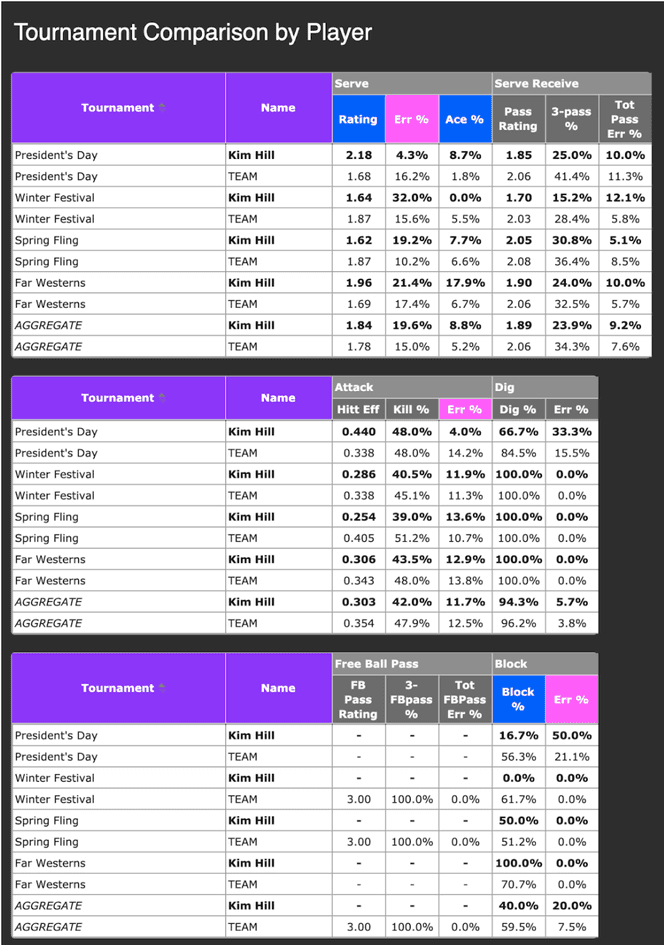
Trend Reports allow you to see match-to-match and tournament-to-tournament changes in your team's performance. This analysis helps you:
- Track performance trends over time to measure improvement
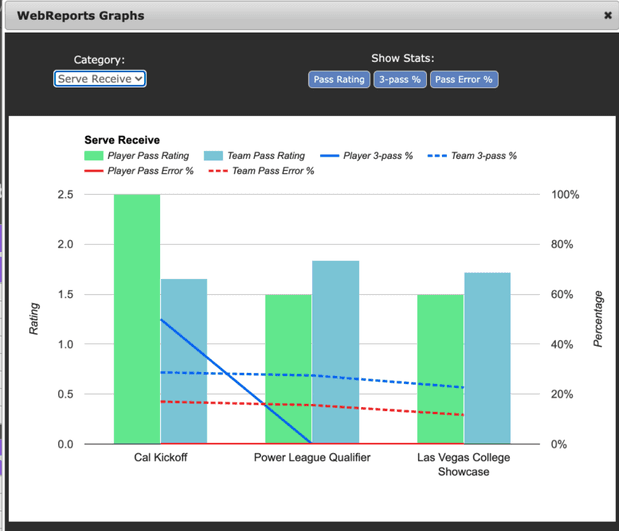
- Compare individual player stats to team averages
- Identify which players are improving or declining
- Visualize data with graphs for easy analysis
Learn more with our Trend Reports Tutorial.
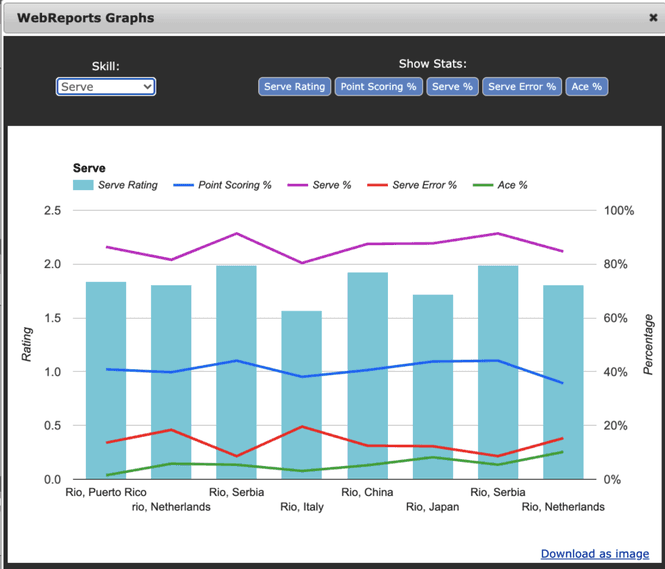
Team Trend by Skill Graph
Player Stats Compared to Team Average by Tournament
Player Stats Compared to Team Average per Skill by Tournament
Frequently Asked Questions
Do I need the Starter Bundle to use WebReports?
Yes, WebReports is included with the Starter Bundle. Start tracking for free with SoloStats123, then upgrade to access WebReports analytics.
Can I export stats to MaxPreps?
Yes, WebReports includes MaxPreps export functionality. Export your stats directly to MaxPreps with one click.
How do I access WebReports on mobile?
Use SoloStats Coach for mobile access to WebReports analytics. The mobile interface is optimized for phones and tablets.
Can multiple coaches access the same WebReports?
Yes, with the Starter Bundle, multiple devices and users can access WebReports. Perfect for assistant coaches and team administrators.